
Cable ends include crimped (with 5-15N pull-off force for 18-22AWG wires, common in automotive vibrations), soldered (300-400°C soldering iron, <0.1mΩ contact resistance for precision electronics), insulation displacement (IDC, piercing 22-10AWG insulation without stripping, 10Gbps data transmission), and threaded (M3-M6 terminals, 0.5-2N·m torque for industrial equipment, vibration-resistant).
Table of Contents
USB Types and Uses
USB connectors are one of the most common interfaces in the digital world, with over 10 billion USB-enabled devices shipped annually. The standard has evolved significantly since its introduction in 1996, with each new version offering substantial improvements in data transfer speed and power delivery. For instance, the latest USB4 standard supports data rates up to 40 Gbps, a massive leap from USB 2.0’s 480 Mbps. Furthermore, modern USB Power Delivery (USB-PD) specifications can now deliver up to 240 watts of power, enabling everything from fast-charging smartphones to powering high-performance laptops.
| USB Type | Max Data Speed | Max Power | Common Uses |
|---|---|---|---|
| USB-A 2.0 | 480 Mbps | 2.5 W (5V/0.5A) | Keyboards, Mice, Old Chargers |
| USB-A 3.0 | 5 Gbps | 4.5 W (5V/0.9A) | External HDDs, Flash Drives |
| USB-B 2.0 | 480 Mbps | 2.5 W (5V/0.5A) | Printers, Scanners |
| Micro-B 2.0 | 480 Mbps | 10 W (5V/2.0A) | Older Android Phones, Power Banks |
| USB-C (USB 3.2) | 20 Gbps | 100 W (20V/5A) | Modern Laptops, Phones, Tablets |
| USB-C (USB4) | 40 Gbps | 240 W (48V/5A) | High-end Laptops, Docking Stations |
The most recognizable port, the standard USB-A, is rectangular and has been the host connector for computers and chargers for over 20 years. While the physical shape has remained consistent, its internal capabilities vary greatly. A blue-colored USB-A 3.0 port transfers data at 5 Gbps, which is over 10 times faster than the 480 Mbps maximum of the older, black-colored USB 2.0 version.
For connecting peripherals like printers and audio interfaces, the squarish USB-B and smaller Micro-B connectors were the standard for years, with the latter supporting up to 10 watts of charging power for older mobile devices. The modern solution is the oval-shaped USB-C connector. Its 24-pin design is reversible and supports the latest protocols. A USB-C port using the USB4 standard can achieve a 40 Gbps data transfer rate, enough to drive two 4K displays simultaneously. Critically, a USB-C cable supporting USB Power Delivery can charge a device like a MacBook Pro 16-inch at its full 140-watt capacity, reducing charge time by approximately 50% compared to a 96-watt charger.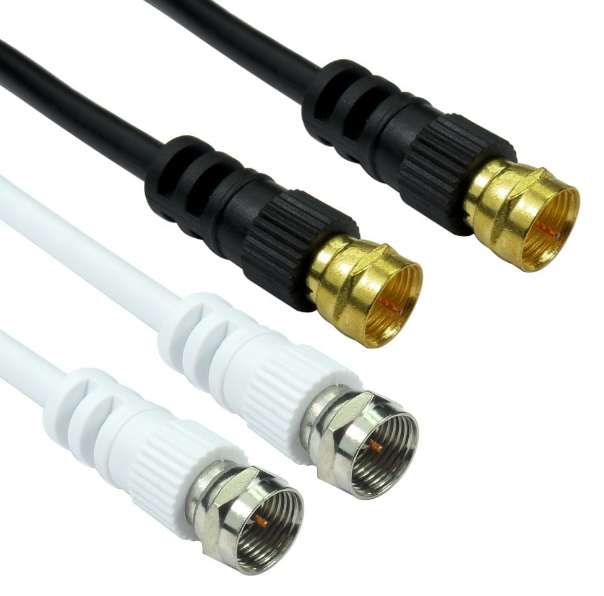
HDMI Connector Variants
HDMI (High-Definition Multimedia Interface) has been the standard for digital audio/video connectivity for nearly two decades, with over 10 billion devices equipped with HDMI ports. The specification has evolved through several versions, each dramatically increasing bandwidth to support higher resolutions and refresh rates. HDMI 2.1, the current major version, supports a maximum data rate of 48 Gbps, a 300% increase over the 18 Gbps offered by HDMI 2.0. This enables features like 8K resolution at 60 Hz and 4K at 120 Hz, which are essential for next-generation gaming consoles and home theater systems.
| Connector Type | Max Supported Resolution | Common Device Applications | Relative Size |
|---|---|---|---|
| HDMI Type-A (Standard) | 8K @ 60Hz / 4K @ 120Hz | TVs, Monitors, Consoles, PCs | 100% Baseline |
| HDMI Type-C (Mini) | 4K @ 60Hz | Tablets, Small Laptops | ~60% of Type-A |
| HDMI Type-D (Micro) | 4K @ 60Hz | Smartphones, Action Cameras | ~40% of Type-A |
| HDMI Type-E (Automotive) | 1080p @ 60Hz | Vehicle Infotainment Systems | N/A |
The full-sized Type-A connector is the most common, measuring 13.9 mm × 4.45 mm. It is found on virtually all TVs, projectors, and desktop graphics cards. To achieve the full 48 Gbps bandwidth of HDMI 2.1, a certified Ultra High Speed HDMI cable is required, which can cost between 50 depending on length and brand.
For smaller devices, the Type-C Mini and Type-D Micro connectors were developed. The Mini connector is approximately 60% the width of a Standard Type-A and was common on older portable electronics like 7-inch to 10-inch tablets. The even smaller Micro connector, at roughly 40% the size of Type-A, is used in extremely compact devices such as some smartphones and action cameras; for example, the DJI Osmo Action camera uses a Micro HDMI port for video output. It is crucial to note that while the physical connector size changes, a Mini or Micro HDMI cable can still support up to 4K resolution at 60 Hz with an 18 Gbps bandwidth, provided the internal wiring and connected devices support the HDMI 2.0 standard.
A common point of confusion is that the physical connector does not dictate the HDMI version capability. You can have a Standard Type-A port that only supports the older HDMI 1.4 standard (10.2 Gbps, max 4K@30Hz) and a Micro HDMI port that supports the latest HDMI 2.1 features. For the best performance, always match the cable’s certification (e.g., High Speed or Ultra High Speed) to the capabilities of your source device and display. For automotive applications, the Type-E connector includes a locking tab to prevent vibrations from dislodging the cable and is designed to operate reliably in temperature extremes from -40°C to +85°C.
Ethernet RJ45 Details
Over 90% of enterprise networks rely on structured cabling with RJ45 jacks. The performance is defined by cable categories, with Cat5e supporting 1 Gbps for up to 100 meters and the latest Cat8 supporting 25 Gbps or even 40 Gbps over shorter distances of 30 meters. These cables typically use 8 wires arranged in 4 twisted pairs, and the connector itself has 8 pin positions. The average lifespan of a well-manufactured RJ45 plug is approximately 1,500 insertion cycles.
- Cat5e (Category 5 enhanced): This is the baseline for modern installations, supporting 1 Gbps speed at a bandwidth of 100 MHz over the standard 100-meter channel. It is the most cost-effective solution, with a 1000-foot spool costing between 120.
- Cat6: Designed for higher performance, Cat6 supports 1 Gbps up to 100 meters and can achieve 10 Gbps speeds at shorter distances, up to 55 meters. It operates at a bandwidth of 250 MHz. The cable often includes a spline to reduce crosstalk, increasing its diameter to approximately 5.7mm, compared to Cat5e’s 5.2mm.
- Cat6a (Augmented): This category is the reliable standard for full 10 Gbps performance across the full 100-meter distance. It doubles the bandwidth of Cat6 to 500 MHz. The thicker gauge and improved shielding make it stiffer and more challenging to install, with a typical diameter of 6.5mm to 7mm. A pre-terminated patch cable costs about 30% more than an equivalent Cat6 cable.
- Cat7/Cat7a: While not an official TIA/EIA standard, these cables are designed for data centers. They feature extensive individual pair shielding and a overall shield, supporting bandwidths of 600 MHz (Cat7) and 1000 MHz (Cat7a). They can support 40 Gbps at 50 meters and 100 Gbps at 15 meters.
- Cat8: The current pinnacle for copper cabling, Cat8 is engineered for data center switch-to-server connections. It supports 25 Gbps and 40 Gbps speeds at a bandwidth of 2000 MHz. However, its maximum channel length is reduced to 30 meters. It is fully shielded and the most expensive, with a single patch cable often costing over $50.
For Cat6a and above, high-performance plugs are used to maintain the cable’s shielding integrity and minimize signal loss. The termination process requires precision; a poor termination can introduce signal return loss of -20 dB or worse, crippling performance. For most home users running internet speeds under 1 Gbps, Cat5e is sufficient. For a new installation or for a future-proofed home office supporting multi-gigabit internet plans up to 10 Gbps, Cat6a provides the best balance of performance, cost, and guaranteed speed over distance. The connectors themselves are rated for a specific number of mating cycles, with commercial-grade jacks rated for 750 cycles and premium ones exceeding 1,500 cycles. The wire gauge is also critical; most solid-core installation cable uses 23 or 24 AWG copper, with larger gauge numbers (e.g., 26 AWG) reserved for thinner, more flexible patch cables that sacrifice a small amount of maximum distance for improved flexibility.
Power Cable Connections
Power cables and connectors form the critical link between electrical devices and their energy source, with global electricity consumption for residential and commercial use exceeding 23,000 terawatt-hours annually. The efficiency of this connection directly impacts performance and safety; a poor connection can result in a voltage drop of over 5%, leading to inefficient operation and potential device damage. Standard household AC power in the US operates at 120 volts and 60 Hz, with a single outlet capable of delivering up to 1,800 watts (15 amps). In contrast, high-power computing equipment or servers may require 208-240 volt connections, delivering between 3,000 and 4,800 watts to a single cabinet.
- IEC 60320 Connectors: The international standard for equipment power inlet/outlet connectors.
- NEMA Plugs & Sockets: The standard for North American wall outlets and power cords.
- USB Power Delivery (PD): A protocol for DC power delivery over USB-C cables.
- DC Barrel Connectors: Common low-voltage DC plugs for small electronics.
- Magnetic Safety Connectors: Proprietary breakaway connectors for laptops.
| Connector Type | Max Power Rating | Common Applications | Key Specifications |
|---|---|---|---|
| IEC 60320 C13/C14 | 10A / 250V (2,500W) | Desktops, Monitors, Servers | Temp. Rating: 70°C |
| IEC 60320 C19/C20 | 16A / 250V (4,000W) | High-Power Servers, UPS | Temp. Rating: 70°C |
| NEMA 5-15P | 15A / 125V (1,875W) | Standard US Wall Plug | 2 Poles, 1 Ground |
| NEMA 6-20P | 20A / 250V (5,000W) | Appliances, Workshops | 2 Poles, 1 Ground |
| USB-C PD | 5A / 48V (240W) | Laptops, Phones, Peripherals | Programmable V/W |
The most common power connector for computers and monitors is the IEC 60320 C13/C14 pair, rated for 10 amps and 250 volts, handling a maximum continuous load of 2,500 watts. Its larger counterpart, the C19/C20 connector, is rated for 16 amps, supporting up to 4,000 watts and is used in high-density server racks and large uninterruptible power supplies (UPS). The plug and cable gauge are directly correlated; a C13 cable is typically 18 AWG for runs under 2 meters, while a C19 cable for the same length must use a thicker 14 AWG or 12 AWG wire to safely carry the higher current without exceeding a 3% voltage drop.
For wall outlets, the NEMA 5-15 is the standard 125V plug, but for high-power devices like laser printers or industrial tools, a NEMA 6-20 plug is required, which delivers 250 volts at 20 amps for a total of 5,000 watts. On the DC side, USB Power Delivery 3.1 has revolutionized device charging, allowing a USB-C cable to negotiate a variable voltage from 5V up to 48V and currents up to 5A, enabling a full 240 watts of power to charge a laptop in approximately 90 minutes. This is a 400% increase from the previous 100-watt limit. For proprietary low-voltage systems, DC barrel connectors are common but poorly standardized; their dimensions (e.g., 5.5mm x 2.1mm) and voltage (e.g., 12V) must be matched exactly, as a 1mm difference in inner pin diameter will prevent connection. Finally, magnetic safety connectors like those on MacBooks are designed for over 10,000 insertion cycles and will cleanly disconnect with a 2.5 kg / 5.5 lb pull force, preventing costly damage from tripping on the cable.
Audio and Video Plugs
The global professional audio equipment market, which heavily relies on these analog connections, is valued at over $23 billion annually. Unlike digital signals that transmit binary data, analog connectors carry continuous electrical signals representing sound waves or video intensity. This makes them susceptible to noise and interference; a poorly shielded cable can introduce a hum with an amplitude of -60 dBV, which is clearly audible in a quiet recording. From the ubiquitous 3.5mm jack found on billions of smartphones to the robust XLR cables used in live sound environments, each connector type is engineered for a specific purpose, balancing signal fidelity, durability, and cost.
- RCA (Phono) Connectors: The standard for consumer analog audio and composite video.
- 3.5mm (1/8″) TRS Jacks: The universal connector for personal headphones and portable devices.
- 6.35mm (1/4″) TS/TRS Jacks: The professional standard for electric instruments and studio equipment.
- XLR Connectors: The balanced audio workhorse for microphones and pro audio gear.
- TOSLINK (Optical Audio): A digital audio fiber optic connection for home theaters.
A critical but often overlooked specification is the difference between unbalanced and balanced audio. Unbalanced cables, like RCA and TS jacks, use two conductors: a signal wire and a ground. They are susceptible to picking up noise over runs longer than 5-7 meters (15-20 feet). Balanced cables, like XLR and TRS, use three conductors: positive, negative, and ground. This design allows receiving equipment to cancel out any noise picked up in the cable, enabling clean runs of 100 meters (300 feet) or more without signal degradation. The noise rejection can be as effective as 20-30 dB, which is crucial in environments with heavy electromagnetic interference.
Each cable carries a single channel, so stereo audio requires a pair (red and white), while composite video uses a single yellow cable. The signal level for audio is typically around 0.3 to 1 volt, making it susceptible to interference. For personal audio, the 3.5mm TRS (Tip-Ring-Sleeve) jack is omnipresent. A standard stereo jack has three contact points, supporting left channel, right channel, and a common ground. Its smaller cousin, the 2.5mm jack, is less common and typically used for older smartphone headsets. The professional counterpart is the 6.35mm (1/4 inch) jack. A TS (Tip-Sleeve) version is used for unbalanced signals like electric guitars, which have a high-impedance output of around 10k ohms. A TRS version can carry either a balanced stereo signal or an unbalanced mono signal with send and return channels for headphones. The physical durability varies greatly; a cheap 3.5mm jack might withstand only 1,000 insertion cycles, while a professional Neutrik 6.35mm jack is rated for over 10,000 cycles.
For critical audio applications, the 3-pin XLR connector is the industry standard. Its balanced design cancels noise, and its locking mechanism provides a secure connection. It carries a low-impedance mic-level signal (around 2-10 mV) or a line-level signal (around 1.23V). For digital audio, the TOSLINK optical connector uses a fiber optic strand to transmit a digital light signal, immune to electrical noise entirely. It supports compressed 5.1 surround sound formats like Dolby Digital at a data rate of 125 Mbps to 1.5 Gbps for newer versions, over a maximum distance of about 10 meters before light attenuation degrades the signal.
Coaxial Cable Terminations
Coaxial cable remains a foundational technology for transmitting radio frequency (RF) signals, with an estimated 90% of residential broadband in North America relying on it for the “last mile” connection. The global coaxial cable market, valued at over $30 billion, supports applications from cable internet and TV broadcasting to cellular networks and military communications. Its design—a central conductor surrounded by insulation, a metallic shield, and an outer jacket—is optimized to carry high-frequency signals with minimal interference. The impedance, a measure of opposition to the signal, is standardized at either 50 ohms for data and wireless communications or 75 ohms for video and broadband. A poor termination can cause a impedance mismatch as high as 20%, leading to signal reflection that can degrade digital internet performance by 15% or more.
| Cable Type / Connector | Impedance | Common Applications | Key Specifications |
|---|---|---|---|
| RG-6 / F-Type | 75 Ohms | Cable TV, Satellite, Broadband Internet | Frequency: 0-3 GHz |
| RG-11 / F-Type | 75 Ohms | Long-Drop CATV, Main Lines | Attenuation: ~3 dB/100ft @ 1GHz |
| RG-58 / BNC | 50 Ohms | Radio Antennas, Wi-Fi Equipment | Power Handling: ~1 kW @ 100 MHz |
| LMR-400 / N-Type | 50 Ohms | Cell Towers, High-Power Radio | Attenuation: ~1.5 dB/100ft @ 1GHz |
| RG-59 / F-Type | 75 Ohms | Short-Run Analog Video (Legacy) | Attenuation: ~6 dB/100ft @ 1GHz |
The most common coaxial cable in residential settings is RG-6, which has a 18 AWG center conductor and is designed for a characteristic impedance of 75 ohms. It is the standard for satellite and cable television installations, as well as modern cable modems delivering gigabit internet. Its larger cousin, RG-11, features a 14 AWG center conductor and exhibits lower signal loss (attenuation), approximately 3 decibels per 100 feet at a frequency of 1 GHz, making it suitable for runs exceeding 150 feet from the street to a house. The primary connector for these 75-ohm systems is the threaded F-type connector. A properly installed compression F-connector provides a weather-tight seal and can last for over 15 years outdoors, while a cheap crimp-on connector may fail within 2-3 years due to corrosion and mechanical stress.
For data and wireless applications, 50-ohm cables are standard. RG-58, with a 20 AWG center conductor, is a flexible cable used for car antennas and short patch cables, but its attenuation is high, around 6.5 dB/100ft @ 1 GHz. For serious applications like connecting a cellular amplifier or a Wi-Fi access point, LMR-400 is the benchmark. With a much thicker 7.2 mm diameter and a solid copper core, its attenuation is a remarkably low 1.5 dB/100ft @ 1 GHz, and it can handle transmitted power up to 1.5 kilowatts at 100 MHz. The connectors for these professional 50-ohm cables are equally robust. The BNC (Bayonet Neill–Concelman) connector, with its quick-lock bayonet mechanism, is common for test equipment and video, rated for up to 500 volts and 500 mating cycles.






